| 일 | 월 | 화 | 수 | 목 | 금 | 토 |
|---|---|---|---|---|---|---|
| 1 | 2 | 3 | 4 | 5 | 6 | 7 |
| 8 | 9 | 10 | 11 | 12 | 13 | 14 |
| 15 | 16 | 17 | 18 | 19 | 20 | 21 |
| 22 | 23 | 24 | 25 | 26 | 27 | 28 |
Tags
- 공식문서
- JavaScript
- useRef
- useMemo
- CSS
- 자바스크립트
- 개발자취업부트캠프
- 자료구조
- 알고리즘
- 모던 딥 다이브 자바스크립트
- 리액트
- 코딩테스트
- 이벤트
- styled-components
- 프로그래머스
- 패스트캠퍼스
- 프론트엔드
- Github
- GIT
- react
- 개발 공부
- 내일배움카드
- MegabyteSchool
- 입문
- 국비지원교육
- TypeScript
- 비전공자
- next.js
- 메가바이트스쿨
- 모던 자바스크립트 딥 다이브
Archives
- Today
- Total
개발 기록 남기기✍️
[CSS] image, background 구분 본문
img 태그
<img src="/img/flower.png" alt="이미지에 대한 자세한 설명" title="이미지 설명" />- alt : src 주소에 오류가 있을 때 나타나는 이미지에 대한 자세한 설명
- title : 이미지 위에 커서를 올렸을 때 나타나는 이미지에 대한 설명
background 속성
li {background-image:url("../img/flower.png");
		background-repeat : no-repeat;
		background-position : 50% 50%;
		background-size : cover;
		}

li {background: center no-repeat url("")
		background-size : cover;
		}
✔️ 기본적으로 background 요소는 부모 요소의 공간을 남기지 않고 해당 이미지를 반복해서 꽉 채워서 표현한다.
- background-repeat :
- x-repeat : x축 방향으로 반복
- y-repeat : y축 방향으로 반복
- repeat : x,y축 방향으로 반복 — 기본
- no-repeat : 반복하지 않음
- background-position :
- 배경이 어느 위치에 있을 것 인지를 설정
- x좌표 y좌표 순서대로 둘 다 입력해야 한다.
- background-position : 30% — x좌표 : 30%, y좌표 : 자동으로 center 처리
- %의 의미 : 부모 요소의 x좌표 30%의 위치에, 본인의 x좌표 30%를 중심으로 삼아 위치시킨다.
- background-size :
- cover : 강제로 늘려서 빈 공간이 없게 함
- contain : width, height 둘 중 하나가 지정된 사이즈에 100%에 도달할 때까지만 늘어남. — 빈 공간 생길 수도 있음
- background-size : auto 20px;
- width와 height 둘 다 작성해야 함. 둘 중 하나는 auto로 쓰는 것을 권장.
- background 요소 안에 image, repeat, position 한 번에 다 들어갈 수 있지만 권장하지는 않음.
.bg_02>li:nth-child(6) {
  background-image: url("../../img/background/jose-duarte-yfQRbv7oYCg-unsplash.jpg");
  background-repeat: no-repeat;
  background-position: 50% 0;
  background-size: cover;

  background-attachment: fixed;
	}
background-attachment : scroll;
➡️ 이미지를 부모 요소에 고정 - 스크롤을 움직여도 사용자 보기에 그림 변화가 없음
➡️ 실제로는 그림이 스크롤을 따라 계속해서 이동하고 있는 것이다.


background-attachment : fixed;
➡️ 이미지를 브라우저 전체를 기준으로 포지션과 사이즈를 조정 - 스크롤 움직일 때마다 해당 위치의 그림 보임
➡️ 실제로 브라우저에 고정되어 있음


background-clip : border-box, padding-box, content-box
.bg_02>li:nth-child(8) {
  background-image: url("../../img/background/laurel-balyeat-ExarETx4xNA-unsplash.jpg");
  background-repeat: no-repeat; background-position: 50% 50%; background-size: 150%;
  padding:50px;
  border : 30px dotted #fa0;
  font-size: 50px; font-weight: 700; line-height: 2; text-align :center;
  background-clip: border-box;
  color :transparent;
}

// background-clip : border-box => 그림이 테두리에 맞춰서 크기 조정됨
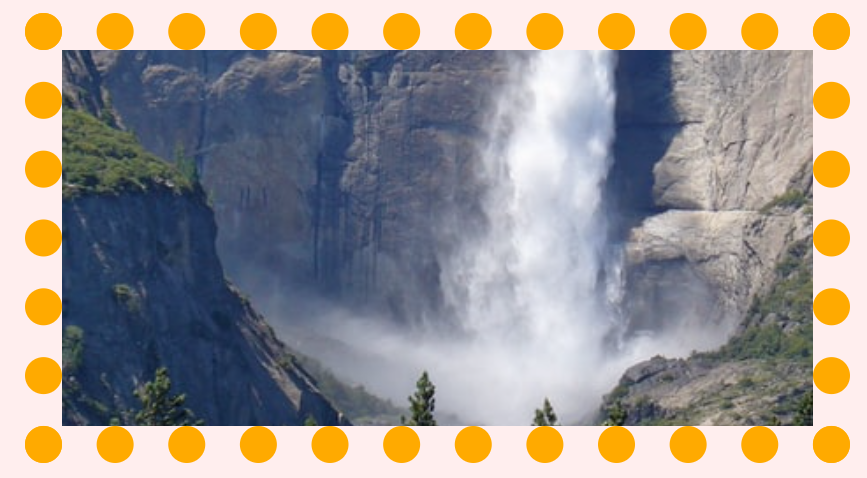
.bg_02>li:nth-child(8) {
  background-image: url("../../img/background/laurel-balyeat-ExarETx4xNA-unsplash.jpg");
  background-repeat: no-repeat; background-position: 50% 50%; background-size: 150%;
  padding:50px;
  border : 30px dotted #fa0;
  font-size: 50px; font-weight: 700; line-height: 2; text-align :center;
  background-clip: padding-box;
  color :transparent;
}
.bg_02>li:nth-child(8) {
  background-image: url("../../img/background/laurel-balyeat-ExarETx4xNA-unsplash.jpg");
  background-repeat: no-repeat; background-position: 50% 50%; background-size: 150%;
  padding:50px;
  border : 30px dotted #fa0;
  font-size: 50px; font-weight: 700; line-height: 2; text-align :center;
	background-clip: text;
  -webkit-background-clip : text;
  -moz-background-clip: text;
  color :transparent;
}

// background-clip : text 안에만 배경이 들어가도록 한다.
// 아직 공식화되지 않은 기능이므로 -webkit-, -moz- 를 붙여야만 사용 가능
// 호환이 되지 않는 브라우저가 많기 때문에 사용하지 않도록!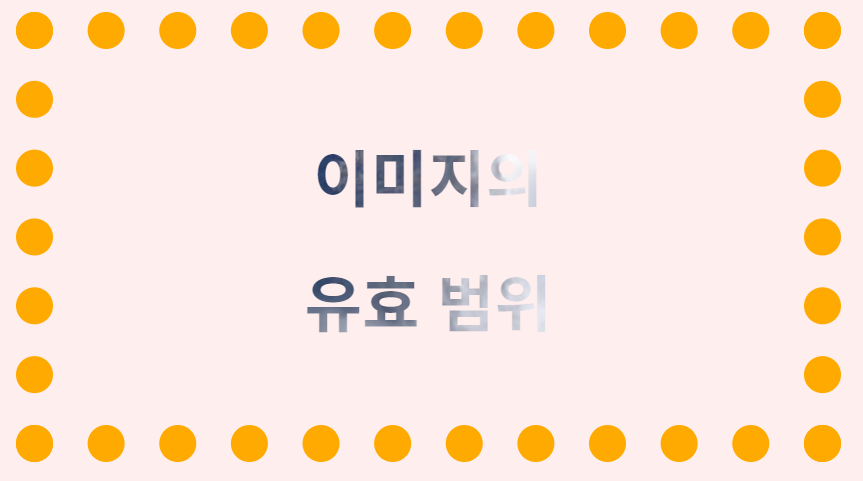
'Front-End > HTML & CSS' 카테고리의 다른 글
| [CSS] font (0) | 2022.07.07 |
|---|---|
| [CSS] ir 기법, is 기법 (0) | 2022.07.07 |
| [CSS] position, z-index (0) | 2022.07.07 |
| [HTML] semantic 구조 (0) | 2022.07.07 |
| [CSS] nth 선택자 이해 (0) | 2022.07.07 |
'Front-End/HTML & CSS' Related Articles
more
